Relightable 3D Gaussian Splatting

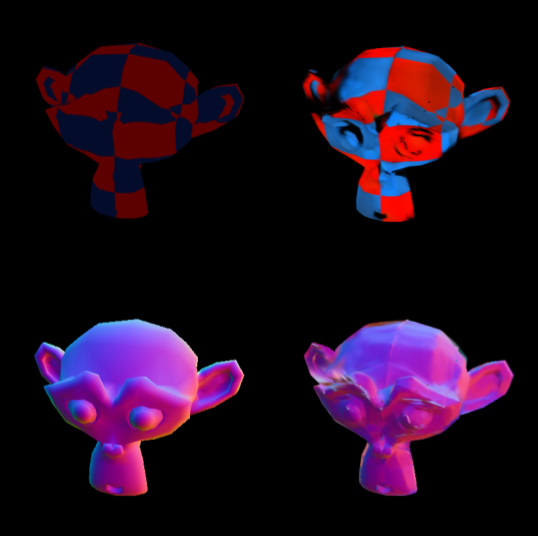
In this project, I modified a 3D Gaussian Splatting (3DGS) pipeline to infer albedo and surface normals, thus allowing for rendering views under novel lighting conditions by applying a Lambertian reflectance model.
I also created a custom dataset (checkered_suzanne) consisting of 400 training images and 30 test images,
which I used to test and validate the pipeline. In this project, I use the standard rasterization and strategy.DefaultStrategy from gsplat (from the Nerfstudio team), used as an unmodified dependency.
Background on Inverse Rendering and 3D Gaussian Splatting
The goal of inverse rendering is to recover properties (structure, geometry, color, material properties, etc.) from a scene/object based on images of the scene. Forward rendering may produce a set of 2D images based on a 3D model, whereas inverse rendering produces a 3D model based on 2D images. Once we have a 3D model, it then allows us to use forward rendering to obtain images of novel views of the scene (views that weren't initially given).
One way of representing 3D scenes/objects is 3D Gaussian Splatting, which uses a collection of different colored Gaussians to approximate the structure and color of the scene/object. This method was originally developed by Kerbl et al. [1].
Here is the equation of a 3D Gaussian, which gives the opacity at position \( \mathbf x \in \mathbb R^3\):
$$ G(\mathbf{x}) = \alpha \exp\left(-\frac{1}{2} (\mathbf{x} - {\mu})^T \Sigma^{-1} (\mathbf{x} - {\mu})\right) $$where \(\alpha \in \mathbb R\) is the overall opacity parameter, \(\mu \in \mathbb R^3\) is the "mean" (most opaque part of the Gaussian) and \(\Sigma \in \mathbb R^{3\times 3}\) is the covariance matrix (describing the stretch and rotation of the shape). \(\Sigma\) can be factored into a scaling matrix \(S = \text{diag}(s_x, s_y, s_z)\) and a rotation matrix \(R\) (parametrized by a quaternion \(q = q_w + q_x i + q_y j + q_z k\) which encodes the same rotation information as \(R\)). In addition, each Gaussian is assigned a color \(c = (r, g, b)\).
A collection of many such Gaussians is combined to create a 3D model of an object or scene. An alpha-blending formula can then be used to render a view of the scene, based on the parameters of all the Gaussians in the scene.
In order to recover a 3D Gaussian model of a scene based on a set of images from different views, the following approach is used:
- Initialize trainable parameters for a certain number of Gaussians: \(\alpha, \mu, (q_w, q_x, q_y, q_z), (s_x, s_y, s_z), c\).
- Use the current model to render a prediction of a view from the training set.
- Calculate the loss based on the prediction render versus ground truth image. Then backpropagate and update the parameters.
- Repeat steps 2 and 3 as many times as necessary to obtain a satisfactory 3D Gaussian model.
Reflectance Model and Relighting
Standard 3DGS allows for rendering novel views, but not under novel lighting conditions. My contribution in this project was to add this capability, allowing images of views under lighting conditions never encountered in the training images. For the sake of simplicity, I restricted the scope of the project to only use a point light source, so different lighting conditions just consist of different positions of the point source.
For standard 3DGS, color is a parameter of each Gaussian. However, the color of a surface depends on the lighting. So in order to allow for relighting, we need to replace the color parameter with an albedo parameter (which never changes regardless of lighting). Then, when rendering a view with a specified light position, we use the albedo along with information from the light position and the surface normals to compute the color.
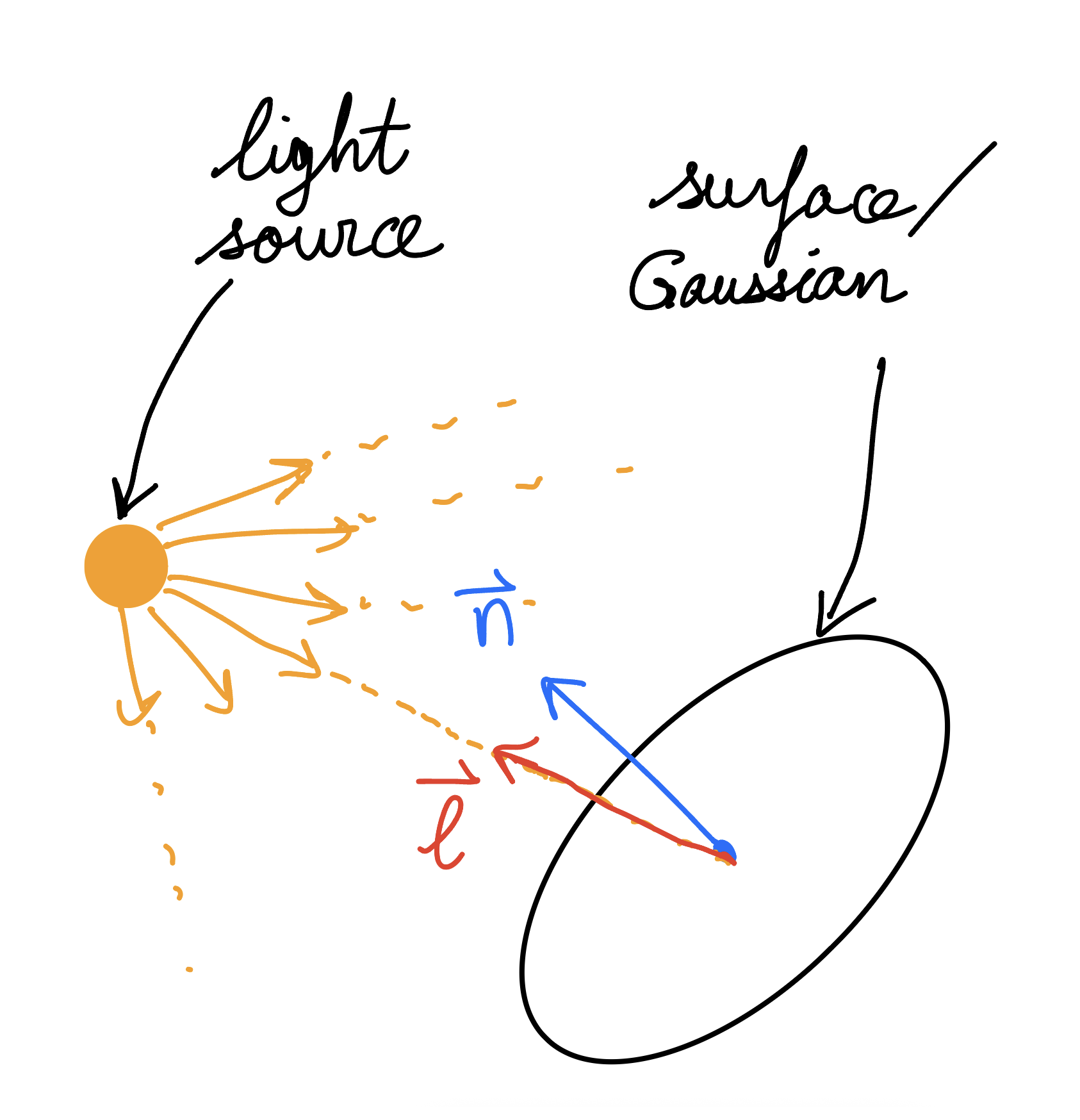
To compute the color in this project, I used a Lambertian model, which assumes a perfectly diffuse (matte) surface. According to this model, the final color of a given point (or Gaussian) in the scene depends (in part) on the unit surface normal vector \(\vec n\) and the unit vector \(\vec \ell\) pointing from the given point to the light source. The relevant vectors are shown below.
Then for each color channel (r, g, b), the image intensity is
$$ I = \frac {k \rho} {d^2} \max(0, \vec n \cdot \vec \ell) $$where \(k\) is a scalar related to the brightness/intensity of the light, \(\rho\) is the albedo for the corresponding color channel and \(d\) is the distance from the point to the light source. The color \(C = (I_r, I_g, I_{b})\) can then be determined for each point in the scene.
In terms of finding the surface normals, we deduce them from the parameters of the Gaussians. We use the idea that the direction in which a Gaussian is the narrowest/flattest corresponds to the direction normal to the material surface. Thus, the surface normals are determined based on \(S = \text{diag}(s_x, s_y, s_z)\) and \(q = q_w + q_x i + q_y j + q_z k\).
Dataset and Training
To be able to infer the albedo of each Gaussian independently of light position, we need to have training images from a number of different lighting conditions. In order to obtain this, I created a custom dataset (which I call checkered_suzanne) for this project using Blender. Here is the Google Drive link to the dataset. I created it using Suzanne, a 3D model of a chimpanzee head, which is provided in Blender. My dataset contains 400 training images, as well as 30 test images. The training set contains images of the model captured with 4 distinct light positions. The test set contains images captured with yet another novel light position.
When training the Gaussian splatting model, I also held out 15 views as a validation set (along with the actual novel light test set) to track the progress of the model as training progressed.
I used the following loss function:
$$ \mathcal L = (1-\lambda) \mathcal L_1 + \lambda \mathcal L_\mathrm{SSIM}$$where \( \mathcal L_\mathrm{SSIM}=1-\mathrm{SSIM} \) and \(\lambda = 0.2\). This is a similar loss function and \(\lambda\) value to what was used by Kerbl et al. [1].
Results
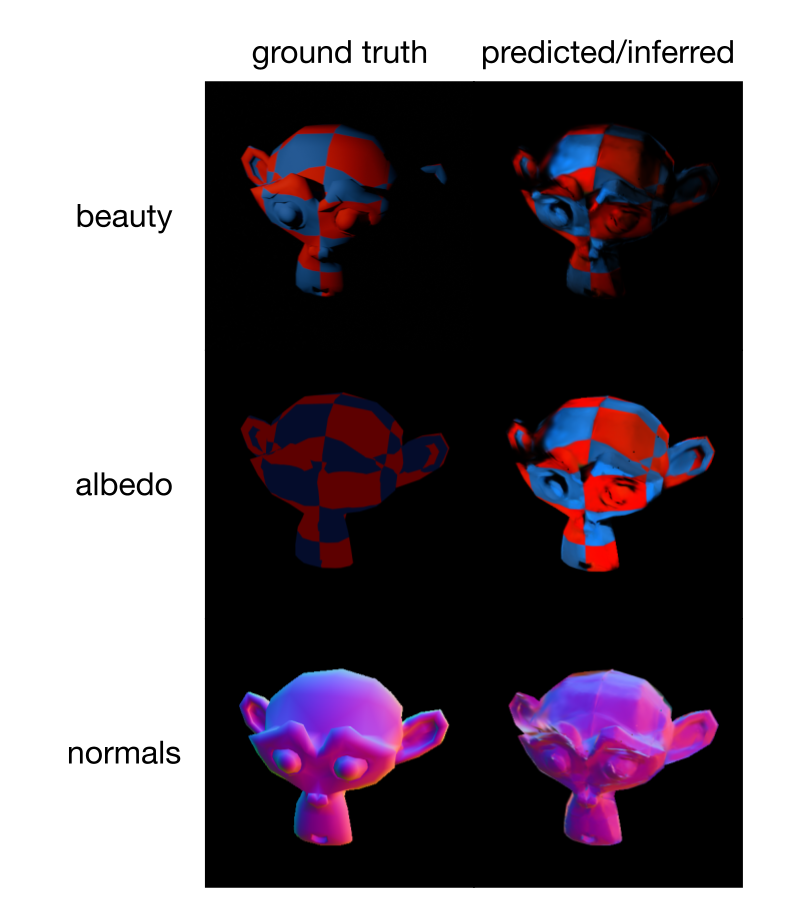
Below are comparisons between the ground truths and predicted/inferred images/properties for views in the test set (under a novel light position). The first row is the beauty render (the actual final rendered image). The second and third rows are color maps of albedo and normals respectively.
The following table shows metrics indicating the accuracy of the reconstruction, calculated as average values on the test set.
| Metric | Value |
|---|---|
| Avg. beauty PSNR (full frame) | 32.53 dB |
| Avg. albedo L1 error (background masked) | 0.6821 |
| Avg. normal angular error (background masked) | 21.74° |
Overall, the accuracy of the reconstruction is fairly good. For the beauty render, the overall shape is good, resulting in a high PSNR. The prediction correctly appears dim in shaded areas, but not completely, which may be a result of error on the surface normals.
In addition, there is a dark spot on the left of the beauty render around the base of the ear, which should not be there. This is likely due to albedo being incorrectly dark in that area, as can be seen in the albedo comparison. Perhaps this is due to training light sources all having a common shaded area, making it impossible for the model to differentiate between a genuinely dark albedo and just a part of the object that is currently in the shade. This reveals a limitation of the approach, in that many different training light positions are required to achieve an accurate reconstruction. We can account for this by using more light positions within the training set.
The predicted albedo appears structurally similar to, but systematically brighter than the ground truth. This is perhaps due to the unconstrained intensity factor \(k\), which likely compensated for the higher albedo, allowing the beauty to have the correct final brightness. This therefore has minimal impact on the final beauty render, despite contributing a lot to a large albedo L1 error.
In terms of surface normals, the color map renders seem pretty accurate, though with some small inaccuracies and some noise, which likely explain the 21.74° average error. This is still a pretty significant error, so this may be a relevant aspect to investigate and try to improve in the future.
Main Takeaways
This method of inverse rendering with relighting capabilities was effective overall, and also revealed certain areas for improvement. First of all, the albedo predictions are systematically shifted (up in this case) due to the unconstrained intensity factor \(k\). To correct this, we need to add a constraint to the \(k\) factor (e.g. set it to a fixed value based on the specific intensity of the light). Then we can retrain to enable more accurate albedo predictions. Another point is that we only tested the pipeline on one dataset (checkered_suzanne), and that dataset was synthesized in Blender. We should therefore try to test the pipeline on other datasets (including real-world photos) to further evaluate the performance of reconstructions obtained using this pipeline.
References
- [1] B. Kerbl, G. Kopanas, T. Leimkühler, and G. Drettakis, "3D Gaussian Splatting for Real-Time Radiance Field Rendering," ACM Transactions on Graphics, vol. 42, no. 4, 2023. [Online]. Available: https://repo-sam.inria.fr/fungraph/3d-gaussian-splatting/